**[Will's Journal](../index.html)**
(#) **2024/05/30: Remarks About Vulkan**
It has been over week since I started VkGuide, and I am wired in on learning Vulkan. It is interesting to see how a modern
rendering API works in comparison to old school OpenGL 3.3. Below are some remarks about Vulkan based on my limited understanding of rendering APIs.
(###) **Data buffers**
VkGuide uses a different technique to pass vertex data to the pipeline. Opting out of using the typical vkCmdDraw or vkCmdBindVertexBuffers and instead using
descriptor indexing. The guide passes the buffer location (GPU pointer) of the vertex buffer to the pipeline through push constants. The way this is done is gnarly.
I don't have a great amount of experience working directly in memory, so it took me quite a bit to reasonably grasp what was happening. Yet, I feel refreshed when facing
memory-facing code, because it all makes sense - all the way down to hardware level. In fact, it intrigued me so much that I decided to opt out of using Descriptor Pools and
once again go straight to memory with Descriptor Buffers; more on that later.
I really enjoy the idea of buffer references, it maps very intuitively to GPU memory and simplifies the process of allocating and accessing data.
This of course comes with the caveat that you need to be careful not to go out of bounds. Though with vertex indices this shouldn't be an issue (assuming the indices were automatically generated).
(###) **API Changes**
This one isn't about Vulkan as it is about the ecosystem surrounding Vulkan. Why must there always be so much volatility in the API of libaries? My gripe this time is about fastgltf.
The library is a terrific tool to efficiently and rapidly load gltf models; a task which it excelled at in my project. However, why isn't there a clear way to use it?
Their documentation is out of date and VkGuide's instructions contain functions and commands that seem to be from an older version of the API. To find the correct code I had to look at fastgltf's samples.
It can be frustrating trying to get things done when documentation is so sparsely updated.
Vulkan also seems to be continuously updating - not that this is bad. I think it's great that Vulkan always moves to improve the interface between application and GPU, all in the name of speed and control.
From renderpass/framebuffer (which I haven't learned) to dynamic rendering, pipelines to shader objects, descriptor sets to descriptor buffers, buffer attachments to buffer references.
This makes developing in Vulkan feel incomplete; I want to use the newest and fastest tools, I like shiny new things. But at some point I will need to plant my feet and start developing with what I have.
Development can't proceed to a reasonable level if I keep adapting my codebase to support every shiny new tool.
(###) **Using Compute Shader to Draw**
The Compute shader pipeline used to draw the background of the application produced mixed results.
When I change my drawExtent to 500x500, the drawImage doesn't change (it's a little annoying to remake the drawImage whenever the screen rescales) and remains at the default 1700x900.
The shader code might help shed some light on why the background may not look how you expect it to.
~~~~~~~~~~~~~~~~~~~~~~~~~~~~~~~~~~~~~~~~~~~~~~~~~~~~~~~~~~~~~~~~~~~~~~~~~
#version 460
layout (local_size_x = 16, local_size_y = 16) in;
layout(rgba16f,set = 0, binding = 0) uniform image2D image;
//push constants block
layout( push_constant ) uniform constants
{
vec4 data1;
vec4 data2;
vec4 data3;
vec4 data4;
} PushConstants;
void main()
{
ivec2 texelCoord = ivec2(gl_GlobalInvocationID.xy);
ivec2 size = imageSize(image);
vec4 topColor = PushConstants.data1;
vec4 bottomColor = PushConstants.data2;
if(texelCoord.x < size.x && texelCoord.y < size.y)
{
float blend = float(texelCoord.y)/(size.y);
imageStore(image, texelCoord, mix(topColor,bottomColor, blend));
}
}
~~~~~~~~~~~~~~~~~~~~~~~~~~~~~~~~~~~~~~~~~~~~~~~~~~~~~~~~~~~~~~~~~~~~~~~~~
The shader blends based on the resolution of the draw image! Not the resolution of the drawExtent! Of course, this would easily be fixed if I passed drawExtent to the compute shader to
fix the blend factor, but this result didn't bother me. Just a cute little quirk of the compute pipeline implementation in this project.
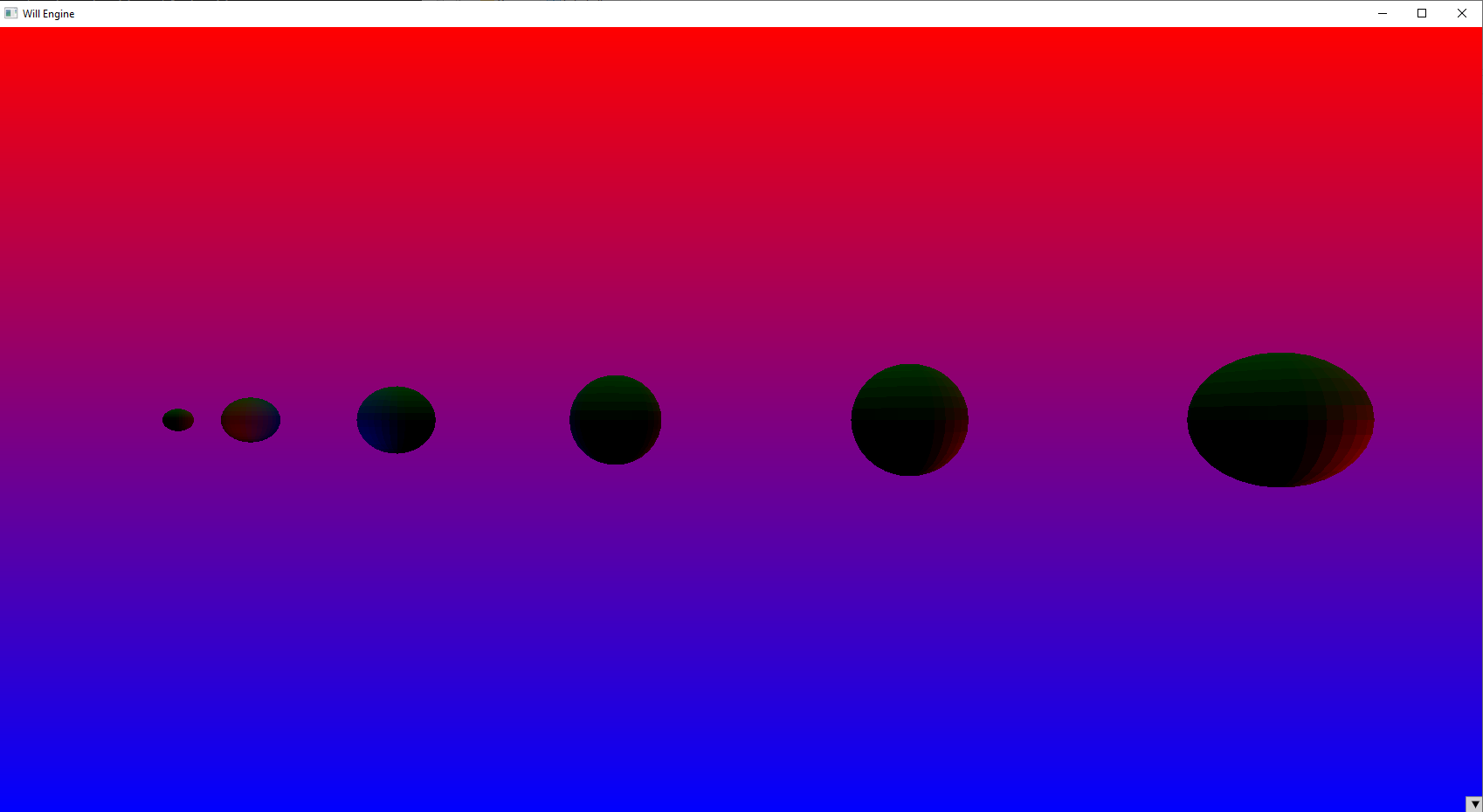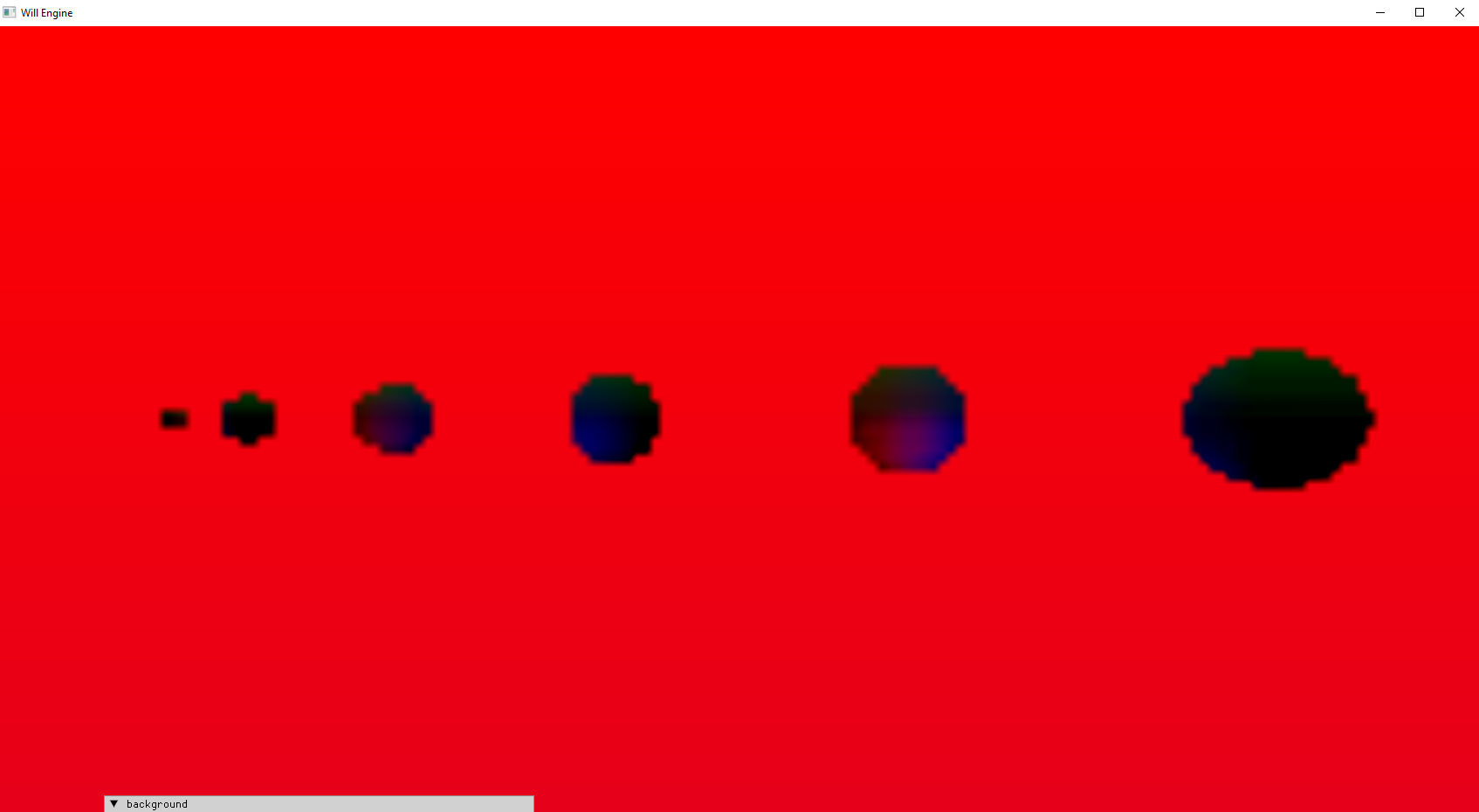
The geometry pipeline was unaffected by this because when rendering you need to specify the drawExtents of the attached images.
VkRenderingInfo renderInfo = vkinit::rendering_info(_drawExtent, &colorAttachment, &depthAttachment);
(###) **Reverse Depth Buffer**
Depth buffer funny-business is no stranger to me. I have seen and read all about it when attempting to create toon shaders and from my time learning OpenGL. Yet, the reverse depth buffer still caused me some grief.
Of course, I understand why it is done: It helps depth precision due to the non-linear distribution. But setting it up cause more issues than it should have; even now, I'm not sure why it took me so long to do 3 things:
- If using GLM do **`#define GLM_FORCE_DEPTH_ZERO_TO_ONE`** before you include the matrix header files.
- Swap near and far in glm::perspective
- **`glm::mat4 proj = glm::perspective(glm::radians(70.0f), (float)_windowExtent.width / (float)_windowExtent.height, 10000.0f, 0.1f);`**
- Change depth stencil reset value to 0
- **`VkClearValue depthClearValue = { 0.0f, 0 };`**
- Change depth comparison operator to **`VK_COMPARE_OP_GREATER_OR_EQUAL`** when building your pipeline
- **`pipelineBuilder.enable_depthtest(true, VK_COMPARE_OP_GREATER_OR_EQUAL);`**
(###) **Descriptor Buffer**
After a few days of tinkering with it and mutilating the VkGuide project code, I have successfully set up descriptor buffers to be fully working. I can't believe I did it! While setting it up, I couldn't help
feel lost because of how little information exists out there about it. Is noone talking about it? I don't see many forum posts about it. It is fairly new, maybe there won't be many more forum posts because the age
of the forum is dead? Guess we can thank LLMs for that.
So I decided to write a blog post about it! You can find it here on my website or on medium. I'm sure you can find the links yourselves. My project comes with a wrapper for descriptor buffers that I think could be useful
if you would like a jumping off point for your own descriptor buffer implementations. Just follow the link from the descriptor buffer blog post.
(###) **Diagram of the GPU pipeline**
And I will finish this entry with a small diagram of a typical pipeline in vulkan.
******************************************************************************************************************************
*+-----------------------------------------------+
*| Vertex Input |
*+-----------------------------------------------+
*| Input Assembly |
*+-----------------------------------------------+
*| Vertex Shader |
*+-----------------------------------------------+
*| (Optional) Tessellation |
*+-----------------------------------------------+
*| (Optional) Geometry Shader |
*+-----------------------------------------------+
*| Rasterization |
*+-----------------------------------------------+
*| Clipping | <-- Implicit
*+-----------------------------------------------+
*| Perspective Divide | <-- Implicit
*+-----------------------------------------------+
*| Primitive Assembly (part) | <-- Implicit
*+-----------------------------------------------+
*| Viewport Transformation | <-- Implicit
*+-----------------------------------------------+
*| Fragment Generation | <-- Implicit
*+-----------------------------------------------+
*| Early Fragment Tests | <-- Implicit
*+-----------------------------------------------+
*| Fragment Shader |
*+-----------------------------------------------+
*| Late Fragment Tests | <-- Implicit
*+-----------------------------------------------+
*| Color Blending |
*+-----------------------------------------------+
*| Pixel Ownership Test | <-- Implicit
*+-----------------------------------------------+
*| Viewport and Scissor |
*+-----------------------------------------------+
******************************************************************************************************************************