**[Will's Journal](../index.html)**
(#) **2024/06/04: MSAA, Transparency/Cutoff, Shader Object**
I've pretty much finished VkGuide (pending optimization techniques) and have gone forth into the engine development world.
(###) **Shader Objects**
The first thing I implemented was shader objects. It was surprisingly easy to swap out traditional pipelines to this new shader object. Shader Objects is likely the last
shiny new feature that I'll be implementing for my game engine. From here on out, it will be developing features and implementing cool new techniques from research papers!
Shader Objects are supposed to be faster or equal to traditional pipelines when it comes to performance, but comes with additional flexibility when it comes to setting up pipelines.
Changing a shader won't require a full pipeline rebuild now.
Fortunately, shader objects are 100% compatible with descriptor buffers, buffer device addresses, and dynamic rendering. It would've been devastating to have to throw away some complex features.
(###) **MSAA**
Finally implemented MSAA! It was easy enough to set up. MSAA is has dedicated hardware and is well supported by most rendering APIs. Of course, my development was once again slowed by documentation.
There seems to have been some API changes, as the "samples" property is no longer in the render attachment info. Rather it is found during instantiation of the image itself.
Additionally, using shader objects meant to change the state of the pipeline, I also had to call **vkCmdSetRasterizationSamplesEXT(cmd, _rasterizationSamples);**. This was fairly easy to find; the new Vulkan Docs are wonderful.
After initially setting up MSAA, my graphics pipeline was directly over-writing the background drawn by my compute pipeline. The compute shader draws to the image through a storage image descriptor.
In order for MSAA to work, the render attachment image to the pipeline must have VK_SAMPLE_COUNT_X_BIT (where X is sample count).
However, storage images are required to be VK_SAMPLE_COUNT_1_BIT. So how do I convert a VK_SAMPLE_COUNT_1_BIT image to a VK_SAMPLE_COUNT_X_BIT image?
My solution: A basic fullscreen shader! Though its implementation wasn't exactly flawless. It exposed some issues with window resolution modifications and came with a performance cost. Some basic profiling determined that it amounted to about
0.25ms. That seems expensive! It seems that using compute shaders to draw backgrounds has some cost associated with it!
(###) **Transparency/Cutoff**
VkGuide's project already came with a fairly complete implementation of blending, though its focus was primarily additive blending. I managed to get alpha blending to work fairly easily.
While I was at it I decided to also implement alpha cutoff, which is basically opaque with a threshold cutoff for fragments with non 1 alpha. I passed the cutoff value to the fragment shader through push constants.
Push constants are great but I think I'm too liberal with its use. The Vulkan spec guarantees that push constants have 128 bytes of memory.
I use 64 bytes for the model matrix, 48 bytes for the normal-model matrix (mat3x4 for alignment, couldn't seem to get alignas to work), and 8 bytes for buffer device address.
With 4 bytes for the new cutoff threshold I'm up to 124 bytes, with enough space for only 1 more float. I wonder what I'll be using that for.
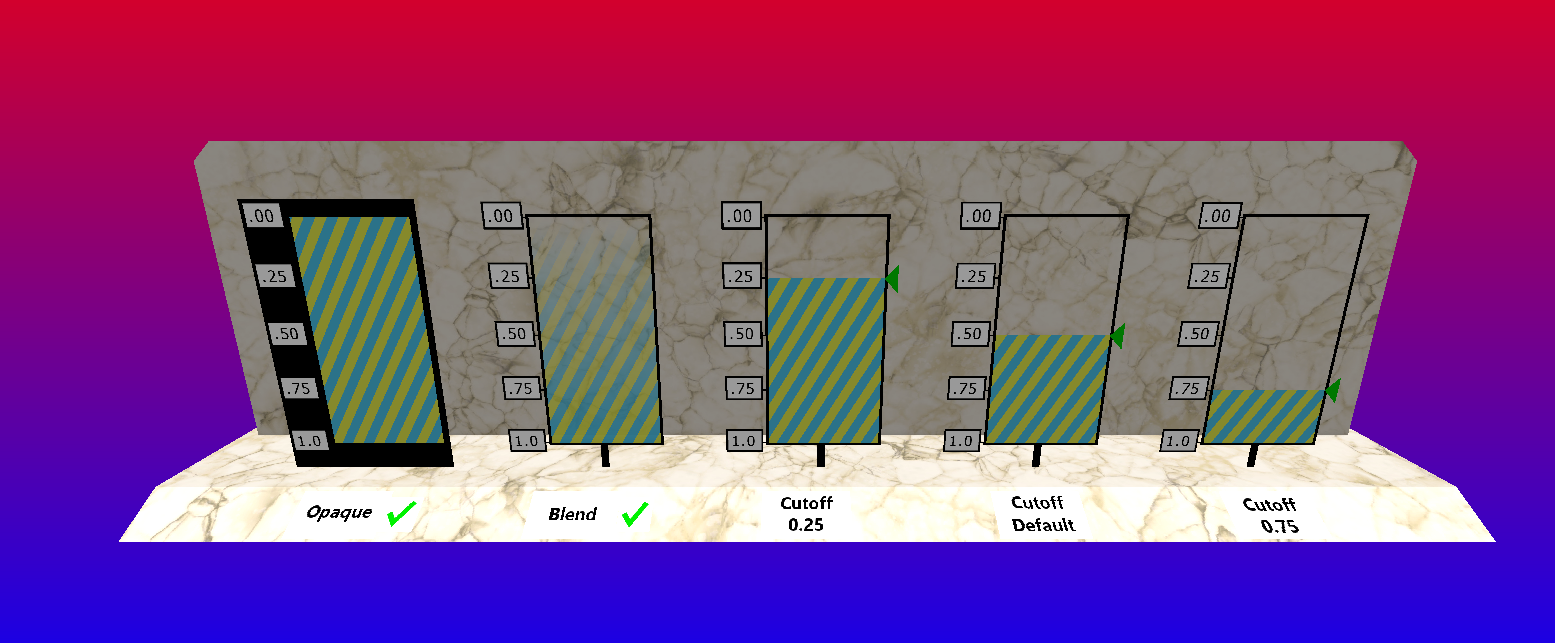
(###) **Draw Image Resize**
This one might not make sense outside of the context of my engine. VkGuide has you set a separate draw image as the render target of your pipelines, and as a final step in the draw call, blit that draw image onto the swapchain image.
I think this is a nice idea even though it may not be immediately useful.
In the past, when rescaling your window, the draw image stayed at a constant 1700x900 resolution, only the swapchain image would change. If the resolution was say, 500x500, you would only draw to the first 500x500 of the draw image, resulting in an unused
portion of the draw image. This is likely more efficient than constantly changing the draw image with each resolution change, but it happens fairly infrequently, so I decided to change it anyway.